Using Mathematica to Solve for Projectile Motion with Air Resistance
Download this Mathematica notebook: newprojectile.nb (save to the desktop using "Download Link to Disk" in Explorer). Launch Mathematica - then open the notebook. The notebook can be evaluated. The object of this exercise is to, by trial and error, find the angle which maximizes range with air resistance present. It is not 45 degrees.
The technique is to run the code with a certain value for the initial angle. Record the range. Then try to go on either side of where the maximum might be in smaller and smaller steps.
This is a listing of the notebook and the output. I will explain the syntax below.
Baseball Trajectory with Air Resistance

cd = 0.35;
rho = 1.2;
area = 4.3/1000.;
mass=0.145;
grav = 9.81


airconst=-0.5 cd rho area/mass;
r1=0.;r2=0.;
vo = 50.;
theta =45;
v1=vo N[Cos[theta Degree]];
v2=vo N[Sin[theta Degree]];
tau=0.05;
range = vo^2 N[Sin[2 theta Degree]]/grav;
time = 2 v2/grav;
height = v2^2/(2 grav);
Print[vo," = vo (m/sec)"];
Print[theta," = theta (degrees)"];
Print[range," = range in vac (m)"];
Print[time," = time in vac (sec)"];
Print[height," = height in vac (m)"];
For[i=1,i<1000,i++,
xplot[i]=r1;
yplot[i]=r2;
normv = Sqrt[v1^2 + v2^2];
accel1 = airconst normv v1;
accel2 = airconst normv v2 - grav;
rr1=r1;rr2=r2;vv1=v1;vv2=v2;
r1 = rr1 + tau v1;
v1 = vv1 + tau accel1;
r2 = rr2 + tau vv2;If[r2<0.,Break[]];
v2 = vv2 + tau accel2;
];
Print[i,"  ",i tau," sec  ",rr1" meters"];
xpl = Table[{xplot[j],yplot[j]},{j,i}];
air=ListPlot[xpl,PlotJoined->True]
Output:
50. = vo (m/sec)
45 = theta (degrees)
254.842\ = range in vac (m)
7.20802 = time in vac (sec)
63.7105 = height in vac (m)
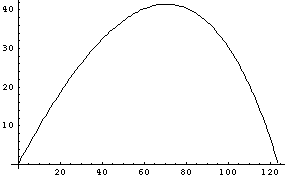
116   5.8  sec  123.725  meters
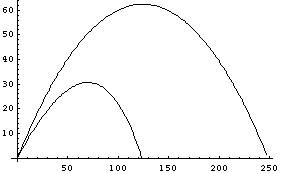
I also ran the above code with the air resistance set equal to zero and called that output "vac" instead of "air". That is, the last line of the code:
air=ListPlot[xpl,PlotJoined->True]
was replaced by:
vac=ListPlot[xpl,PlotJoined->True]
and
airconst=-0.5 cd rho area/mass;
was replaced with
airconst=0.
The command:
Show[{air,vac}]
Allows us to compare the trajectories with and without air resistance.
The physics:
For a baseball, the force of air resistance is proportional to the square of velocity and the resulting deceleration is found to be given by:
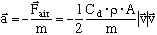
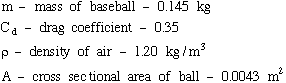
Notice the form of this equation. It guarantees that the resistive force is proportional to velocity squared and it recognizes that the resistive force is always antiparallel to velocity. What are the other constants?
Explanation of the code:
cd = 0.35;
rho = 1.2;
area = 4.3/1000.;
mass=0.145;
grav = 9.81
This defines the constants. Note that commands are separated by semicolons. You can have several commands in a line. In the language of Mathematica this string of commands forms a cell. Click anywhere in the cell and hit return while holding the shift key. This executes the cell.
Notice that the rest of the code is also a string of commands which make up the next cell. This large collection of commands will also be executed by clicking anywhere within the cell and hitting shift/enter.
airconst=-0.5 cd rho area/mass;
r1=0.;r2=0.;
vo = 50.;
theta =45;
v1=vo N[Cos[theta Degree]];
v2=vo N[Sin[theta Degree]];
tau=0.05;
range = vo^2 N[Sin[2 theta Degree]]/grav;
time = 2 v2/grav;
height = v2^2/(2 grav);
Print[vo," = vo (m/sec)"];
Print[theta," = theta (degrees)"];
Print[range," = range in vac (m)"];
Print[time," = time in vac (sec)"];
Print[height," = height in vac (m)"];
This collection of commands finds the range, flight time and max height in vacuum given the initial velocity and angle. Note that Mathematica functions (Sin, Cos, etc..) all start with a capital letter and the arguments appear within square brackets. Also, a space between a variable and another variable or number implies multiplication. The constant Degree in Mathematica is such that when multiplied by degrees yields radians.
For[i=1,i<1000,i++,
xplot[i]=r1;
yplot[i]=r2;
normv = Sqrt[v1^2 + v2^2];
accel1 = airconst normv v1;
accel2 = airconst normv v2 - grav;
rr1=r1;rr2=r2;vv1=v1;vv2=v2;
r1 = rr1 + tau v1;
v1 = vv1 + tau accel1;
r2 = rr2 + tau vv2;If[r2<0.,Break[]];
v2 = vv2 + tau accel2;
];
This is a loop which will fill an array of x and y positions for the projectile. The starting position is x (or r1) equal zero and y (or r2) equal zero. The x and y components of velocity are v1 and v2 and of acceleration are accel1 and accel2. For each time step the acceleration components are computed from the current values of the velocity. The new x and y components are computed from the current x and y and v1 and v2. Then the velocity components are updated.
In the above, the variables rr1, rr2, vv1 and vv2 are just temporary placeholders for the current values of the position and velocity.
This loop is executed, incrementing the variable i by one each time through, until i reaches 1000 or the y position becomes negative, whichever is first. The If[r2<0.,Break[]] command breaks out of the loop if the latter condition occurs.
Print[i,"  ",i tau," sec  ",rr1" meters"];
xpl = Table[{xplot[j],yplot[j]},{j,i}];
air=ListPlot[xpl,PlotJoined->True]
This prints the number of steps taken, the time step, total flight time and range. The other two commands form a table of projectile positions and then plot the results. Use the HELP feature of Mathematica for an explanation of these commands.
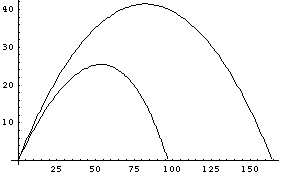
The above is the profile of the trajectory in vacuum launched at
45 degrees and trajectory in air launched at 40 degrees.
In both cases the launch speed is 40 m/sec.